
Before you start
- A product brief with supportable claims
- A custom presenter portrait and finished narration
- Product images or fresh product footage
- A paid workspace for generation and export
Start with one customer situation
A useful UGC-style ad sounds like a person explaining something relevant. Start with a situation your audience recognizes, introduce the product and show the detail that makes it useful. Finish with one action. The style can feel informal while the message remains precise.
Our demonstration uses Pebble, a fictional desk lamp, to tell a small story about making a desk feel calmer. The person and product visuals were created for the Knowledge Base. This is a concept advertisement, not a real customer review or evidence of product performance. For your own ad, use claims and product details you can verify.
Give each shot a job
Build the story before generating more footage. Open with the presenter to establish the voice, show the product when it is first named, and use a close detail when the narration describes its appearance. Return to the presenter for the final action.
A cutaway should explain the sentence being spoken. If it does not add information or support the mood, remove it. Three useful product moments are stronger than a collection of unrelated camera moves. Keep the same reference image across product scenes and compare the silhouette, material and proportions.
- Hook: a recognizable moment or problem, spoken directly to the viewer.
- Reveal: show the product clearly as the narration introduces it.
- Detail: hold long enough to understand the relevant feature.
- Context: show where the product fits into the viewer’s day.
- Close: return to one specific next action.
Create the pieces in Mozify
Open the full example below and use Copy script in its transcript section for a starting point. Replace the fictional product and message with your own. Check every sentence before creating narration; a correction after animation can require another generation.
- Create or upload a suitable custom presenter portrait.
- Record the whole script or generate a single narration through an available speech model in Workflows.
- Combine portrait and audio in Talking Head, reviewing its credit quote first.
- Use your product reference to generate supporting video in the video tool. Review each clip before creating more.
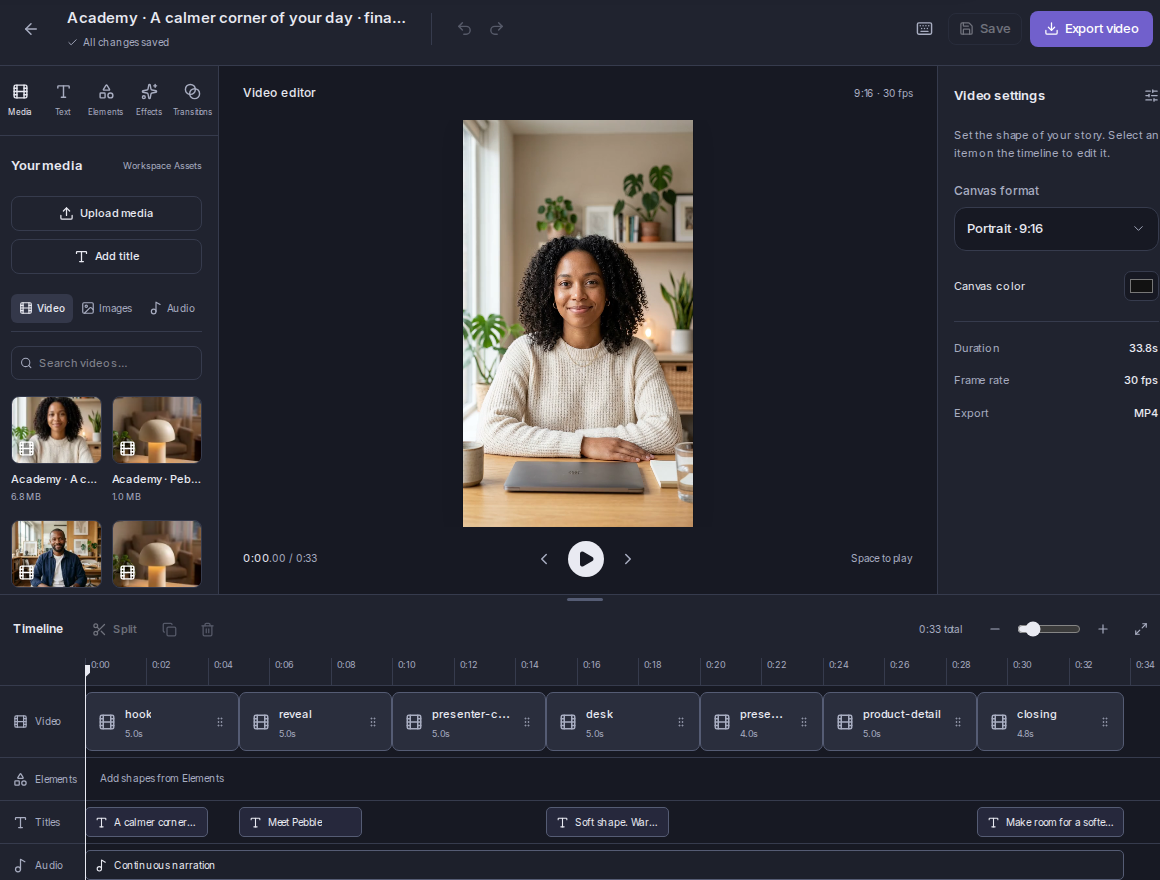
- Open the Editor, alternate presenter and product clips, and keep the narration continuous underneath.
- Add a short title and a final CTA, then export and review the complete ad on a phone.
Watch these steps in Mozify 2:20
A silent walkthrough of the real app: add the portrait and audio, check the quote, review a completed run and open the Editor. On-screen instructions are included; generation waiting time is omitted.
View the finished example, script and inputs →Make the edit easy to understand
Keep the presenter’s original audio muted wherever the separate narration is already playing. Place cuts at sentence boundaries or natural pauses. Avoid covering the face with large text, and give the product enough screen time for a viewer to recognize it.
Use titles to reinforce the point instead of transcribing every sentence in a large block. For accessible playback on the Knowledge Base website, we supply captions separately. Do not confuse those web captions with a promise that the app automatically captions every export.
Review the ad as a viewer
After one viewing, a person should be able to say what the product is, why it appeared and what to do next. If they can only remember the AI face, make the product story more specific. If the product changes shape across scenes, revise the footage before publishing.
The example page includes the complete video, source material and production notes so you can inspect the result yourself. A good-looking demo does not establish sales performance. Test your own creative with a relevant audience and use actual campaign data to decide what to change.
See the finished example 0:34
Give a product a clear story with a relatable presenter and product cutaways. This demonstration uses a fictional AI presenter.
Script, source inputs and production details →