Start from a useful structure.
A template can give the work a direction. The current Workflows library provides canvas templates for supported creative tasks.
MOZIFY / VIDEO TEMPLATES / COMING SOON
Video Templates are being prepared to give creative work a useful starting point. For a reusable production process today, explore the templates already available in Workflows.
THE BRIEF
A bright afternoon campaign for an orange sparkling drink.
OUTPUT 01 / HEADLINE OPTIONS
“Sip ZEST, Savor Every Sparkling Moment”
One of three generated hooks
OUTPUT 02 / SHOT DIRECTION
A warm presenter opening. A slow push-in. A condensation-covered can in the closing frame.
Actual text outputs from a Mozify workflow. Shot direction condensed for this preview.
A template can give the work a direction. The current Workflows library provides canvas templates for supported creative tasks.
Adapt prompts, references and model settings to the product. Keep the structure while changing what the campaign needs.
Review generation costs, inspect the outputs and bring selected assets into the Video Editor to finish the ad.
INSIDE MOZIFY
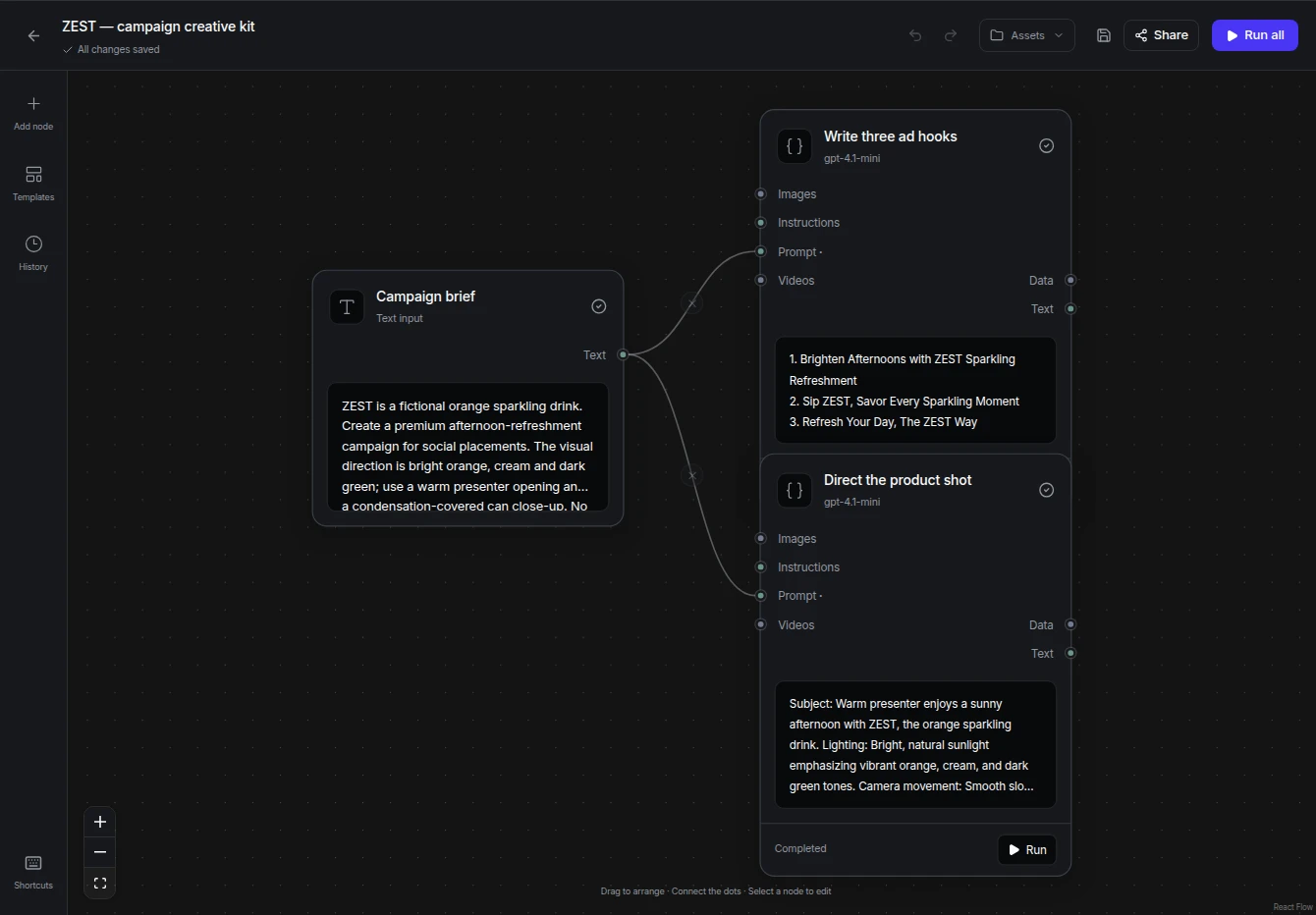
Actual completed workflow: one brief, three headline options and a product-film direction. The outputs in this run are text.
FROM THE FIRST STEP
Choose an available workflow template or start with an empty canvas.
Use your own brief, product references and supported model settings. Check required connections.
Review the quote and outputs, then edit a suitable result. The separate Video Templates catalog will be announced when available.
BUILT AROUND YOUR WORK
Keep a starting structure for a recurring creative task.
Adapt the inputs of a saved process.
Begin with connected steps instead of building a canvas each time.
The separate Video Templates catalog is being prepared. The current alternative is the template library inside Workflows.
Your product, your message, your next ad. Start with an image and build the story in Mozify.